Custom Login
There is a custom login feature that allows you to perform the desired validations and transactions while logging into the eBA application.
Thanks to the method in a dll prepared during eBA login, it allows the user who is trying to log in to log in according to some conditions. For example, these operations can also be applied to log in with the e-mail address instead of the user id, the value of the received e-mail address can be compared in osusers and the password can be returned true if it is correct.
The important point here is that the ExternalUsername information is taken as a basis in user definitions.
Necessary definitions should be made under "Security" on the left in the 'Advanced' tab in the eBAConfigurationEditor where the configurations of the eBA application are made.
```<```Security```>```
    ```<```key name="AuthenticationMode"```>```custom```<```/key```>```
    ```<```key name="AuthenticationType"```>```DLL```<```/key```>```
    ```<```AuthenticationDLL```>```
        ```<```key name="Path"```>```C:\BimserCozum\eBA\Common\eBACustomAuthentication.dll```<```/key```>```
        ```<```key name="TypeName"```>```eBACustomAuthentication.Authentication```<```/key```>```
    ```<```/AuthenticationDLL```>```
    ```<```key name="LoginMode"```>```external```<```/key```>```
    ```<```key name="ExternalUserMatch"```>```equal```<```/key```>```
```<```/Security```>```
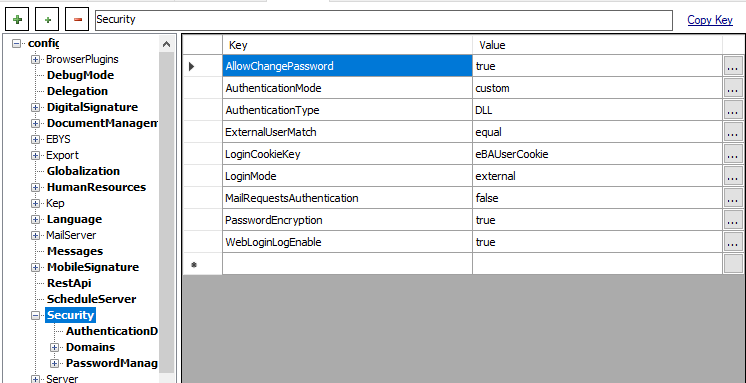
In the definitions made under Security in the eBAConfigurationEditor, definitions such as the file path and name of the external DLL prepared are made. In this example, the method name to use the DLL is Authenticate.
The Authenticate method is called when the user logs in. The aim is to check whether it can log in in accordance with some conditions during login, that is, to validate. In this method, you can have any control you want. When you return a true value, the user will be login, while if you return a false value, they will not be login.
Example for external DLL that needs to be prepared;
using System;
using System.Collections.Generic;
using System.Linq;
using System.Text;
using System.Threading.Tasks;

namespace eBACustomAuthentication
{
    public class Authentication : eBAAuthenticationInterface.IeBAAuthentication
    {
        public bool Authenticate(string userid, string password)
        {
            The eBAAuthenticationInterface dll in the references is located in the eba.net\common directory.
            You should show the dll on your own server as a reference.
            if (userid == "adogru" && password == "0")
            {
                return true;
            }
            else if (userid == "hkar" && password == "0")
            {
                return true;
            }
            else if (userid == "okara@bimser.com.tr" && password == "0")
            {
                userid = "hkar";
                return true;
            }
            else
            {
                return false;
            }
        }
    }
}